


Howto host, resize and post pictures


Thread Starter
Seasoned Member
Joined: Jun 2008
Posts: 274
Likes: 0
From: Morgantown, WV
Year: 1995
Model: Cherokee
Engine: 4.0
Thread Starter
Seasoned Member
Joined: Jun 2008
Posts: 274
Likes: 0
From: Morgantown, WV
Year: 1995
Model: Cherokee
Engine: 4.0

Lets resize some pictures so we can host them. There are a few ways to achieve this.
Microsoft Resize tool
A: Microsoft has a free tool that lets you resize with a few simple clicks in Windows XP.
Here is a walkthrough on how to use it. Its VERY simple.
1.Open the folder that contains the pictures you want to resize. In Thumbnail view, right-click any picture you want to resize, and click Resize Pictures.

2.In the Resize Pictures dialog box, click the size you want your photo to be, and click OK. In general, Small is a good selection for most of your needs, such as e-mailing pictures or posting them to a Web site.

3.The original file, flowers.jpg, is still intact; and a new, resized file, named flowers (Small).jpg, has been added to the same folder.

Photobucket Resizing
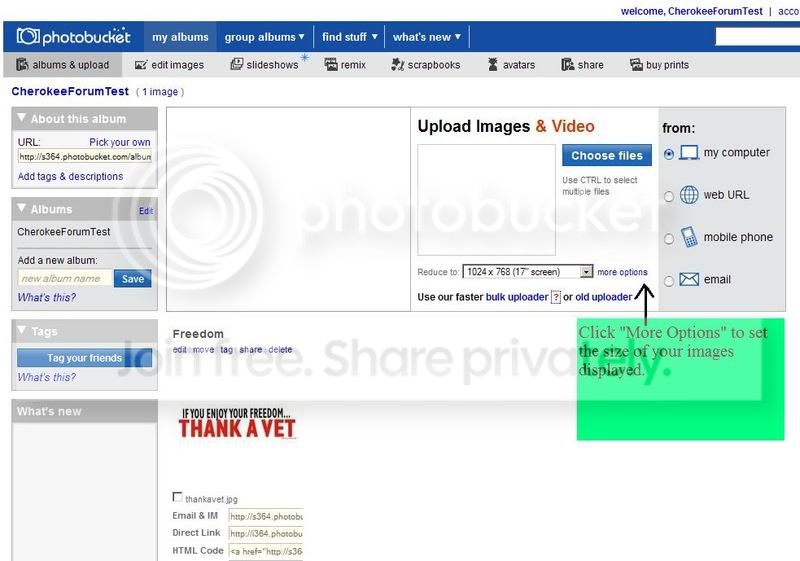
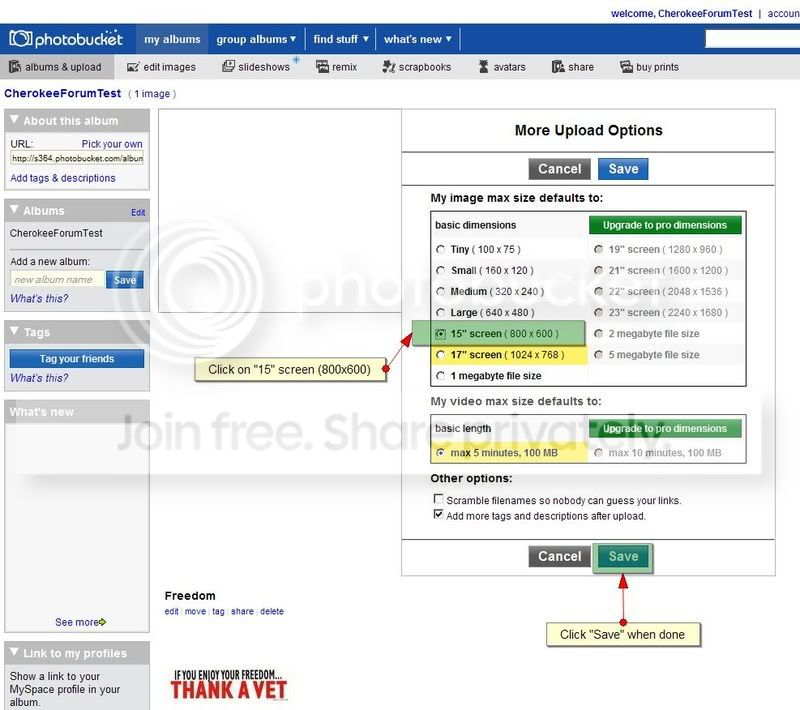
B. Resize the image hosted in photobucket. You can set the size that you want all images to display at when you share them within Photobucket.
Microsoft Resize tool
A: Microsoft has a free tool that lets you resize with a few simple clicks in Windows XP.
Here is a walkthrough on how to use it. Its VERY simple.
1.Open the folder that contains the pictures you want to resize. In Thumbnail view, right-click any picture you want to resize, and click Resize Pictures.
2.In the Resize Pictures dialog box, click the size you want your photo to be, and click OK. In general, Small is a good selection for most of your needs, such as e-mailing pictures or posting them to a Web site.
3.The original file, flowers.jpg, is still intact; and a new, resized file, named flowers (Small).jpg, has been added to the same folder.
Photobucket Resizing
B. Resize the image hosted in photobucket. You can set the size that you want all images to display at when you share them within Photobucket.
Thread Starter
Seasoned Member
Joined: Jun 2008
Posts: 274
Likes: 0
From: Morgantown, WV
Year: 1995
Model: Cherokee
Engine: 4.0
How do I host pictures and then post them?
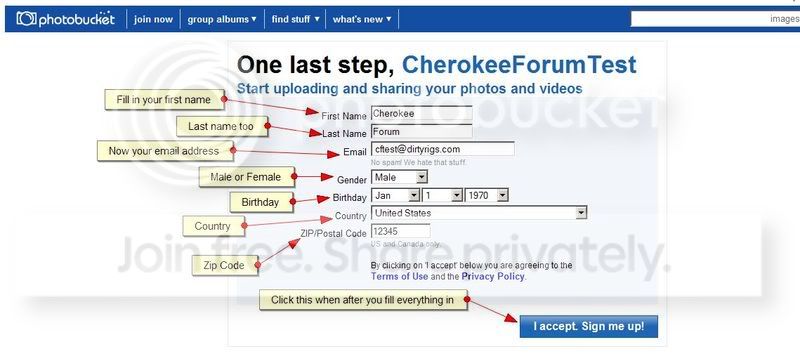
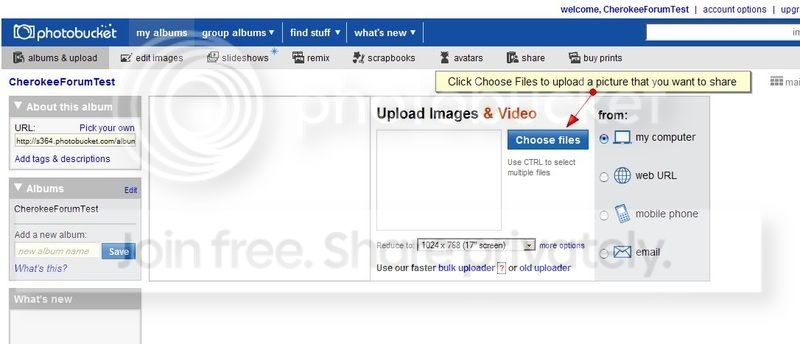
Goto http://photobucket.com/ and sign up for an account. Then upload the pictures you want to share. Its easy!
1

2

3
4

5
6
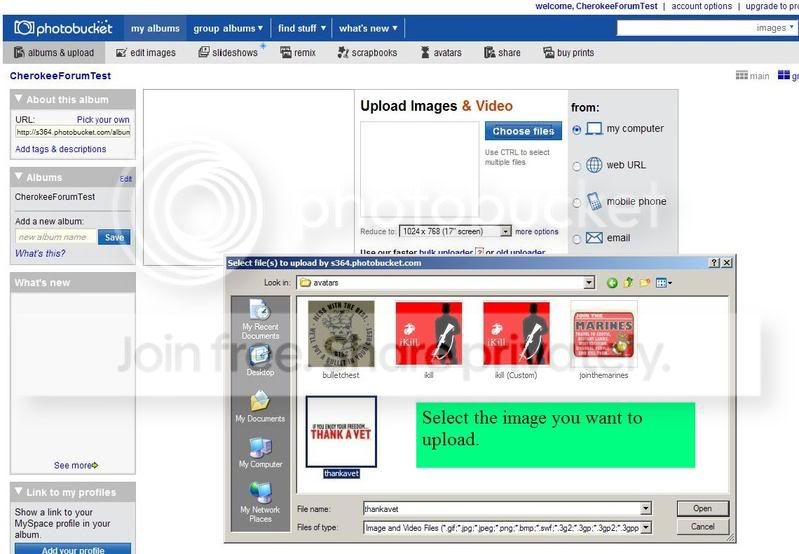
7
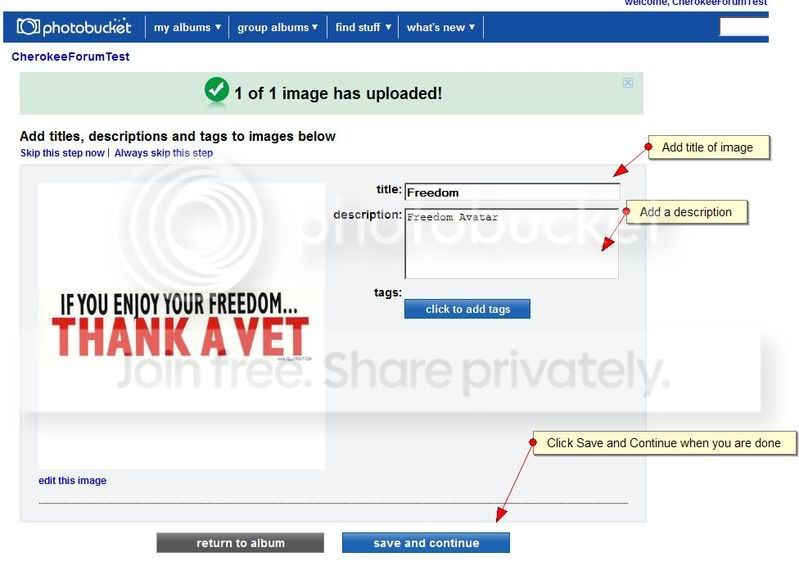
8
9
10
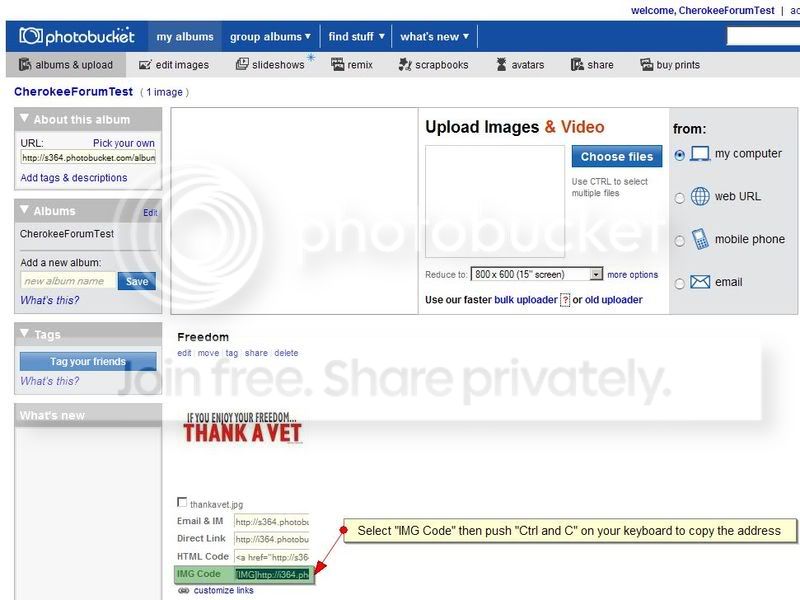
11
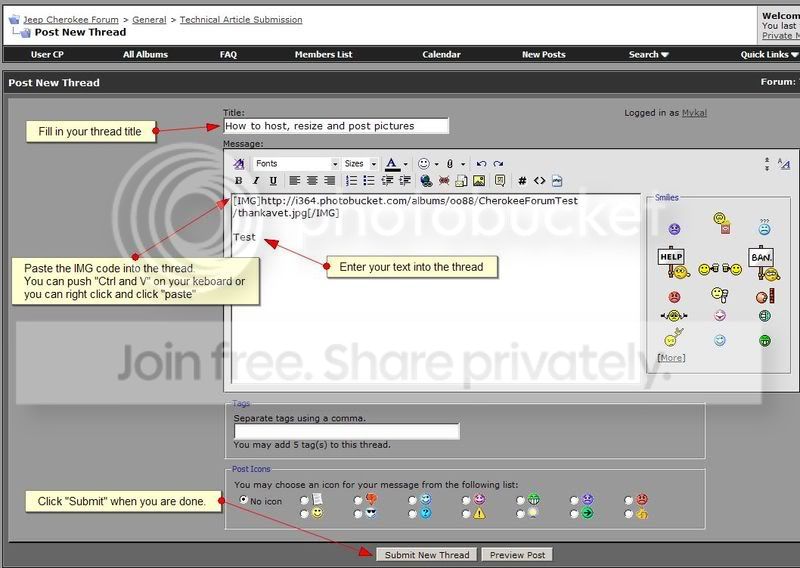
12

Thats It! Your done!
Goto http://photobucket.com/ and sign up for an account. Then upload the pictures you want to share. Its easy!
1
2
3
4
5
6
7
8
9
10
11
12
Thats It! Your done!



Newbie
Joined: Jul 2010
Posts: 1
Likes: 0
Model: Cherokee
Hi all.
This is my first post but not what im here for, but if it helps anyone i have an upload script on my server which includes a resize function.
http://thesmileyone.co.uk/upload.php
anyone is free to use it and i have no google ads running on it (yet..)
This is my first post but not what im here for, but if it helps anyone i have an upload script on my server which includes a resize function.
http://thesmileyone.co.uk/upload.php
anyone is free to use it and i have no google ads running on it (yet..)

Junior Member
Joined: Apr 2011
Posts: 41
Likes: 0
Model: Cherokee
Here is what I do, using http://imgur.com , with a more detailed explanation below:
1: Save image
2: go to http://imgur.com
3: Upload image
4: Copy link (one that says message boards and has [*IMG] brackets)
5: Paste link
EXAMPLE:

I found out about http://imgur.com a while back and it is my personal favorite for uploading because it cuts out the middle man (photobucket and the other sites like it)...For example, if you want to post an image using photobucket you have to:
1) Save image
2) Go to http://photobucket.com
3) Login
4) Select the album you want to put image in
5) Upload image
6) Copy image link
7) Paste link
+all the load times and "save and continue" screens....
However, if you want to SAVE these FOREVER for further use then photobucket is the way to go....but for the quick image pasting imgur is better imo because there are less steps therefore it is faster...
1: Save image
2: go to http://imgur.com
3: Upload image
4: Copy link (one that says message boards and has [*IMG] brackets)
5: Paste link
EXAMPLE:

I found out about http://imgur.com a while back and it is my personal favorite for uploading because it cuts out the middle man (photobucket and the other sites like it)...For example, if you want to post an image using photobucket you have to:
1) Save image
2) Go to http://photobucket.com
3) Login
4) Select the album you want to put image in
5) Upload image
6) Copy image link
7) Paste link
+all the load times and "save and continue" screens....
However, if you want to SAVE these FOREVER for further use then photobucket is the way to go....but for the quick image pasting imgur is better imo because there are less steps therefore it is faster...
Last edited by thegreatgate; May 4, 2011 at 10:56 PM.
Trending Topics

Member
Joined: Jul 2011
Posts: 120
Likes: 0
From: Ohio
Year: 2000
Model: Cherokee
Engine: 4.0
@thegreatgate-http://imgur.com/- That is a cool website. If you want to Save them forever you can bookmark the page with the uploaded image and codes. Very useful website!

Thread
Thread Starter
Forum
Replies
Last Post
Carlisle
Stock XJ Cherokee Tech. All XJ Non-modified/stock questions go here
0
Sep 6, 2015 08:21 AM
Currently Active Users Viewing This Thread: 1 (0 members and 1 guests)