

Couple months ago I hit a huge pothole minutes later I parked and turned the jeep off. the horn then went on and stayed on until I started the jeep. Took it to the shop and we lifted the hood cut the jeep off and the horn was quiet, shut the hood and horn back on. We couldn't figure it out so I disconnected the passenger side horn got in and bumped horn and horn went on and stayed on. Disconnected the driver side horn. I really need to fix the horn before inspection and I plan on installing train horns soon. Help??
97 XJ Cherokee 4.0 6
There seems to be a pressure issue somewhere, wondering if its wiring, clock spring, or if I'm completely off of what it could be.
97 XJ Cherokee 4.0 6
There seems to be a pressure issue somewhere, wondering if its wiring, clock spring, or if I'm completely off of what it could be.

IJM
CF Veteran
close


Today
- Join DateJan 2014
- LocationDistrict of Columbia
- Posts:1,532
- Year1998
- ModelCherokee (XJ)
- Engine4.0
-
Likes:665
-
Liked:349 Times in 270 Posts
Quote:
97 XJ Cherokee 4.0 6
There seems to be a pressure issue somewhere, wondering if its wiring, clock spring, or if I'm completely off of what it could be.
Have you tried replacing the horn itself? Or tried taking it out and bench testing it? I'd eliminate the horn malfunctioning first. Originally Posted by JAY97XJ
Couple months ago I hit a huge pothole minutes later I parked and turned the jeep off. the horn then went on and stayed on until I started the jeep. Took it to the shop and we lifted the hood cut the jeep off and the horn was quiet, shut the hood and horn back on. We couldn't figure it out so I disconnected the passenger side horn got in and bumped horn and horn went on and stayed on. Disconnected the driver side horn. I really need to fix the horn before inspection and I plan on installing train horns soon. Help??97 XJ Cherokee 4.0 6
There seems to be a pressure issue somewhere, wondering if its wiring, clock spring, or if I'm completely off of what it could be.
By the way, do the XJs have two horns or one? Mine only seems to have one. Well, at least only one works.
I honestly haven't had the time to pull it out as I've been pulling overtime like crazy. My XJ has 2 horns and after unplugging the passenger one bumped the steering wheel the horn went on and stayed on again for the drivers side horn. So its making me think the problem could be the clock spring or wiring short. question is if its the wiring where do I start to find the problem. I just don't want to shell out money on the clock spring and have it not fix the issue.

CF Veteran
Just in case it happens to help, the horn relay for my 90 is way up on the inside of the firewall, tucked way up in the corner above left of your left foot.

CF Veteran
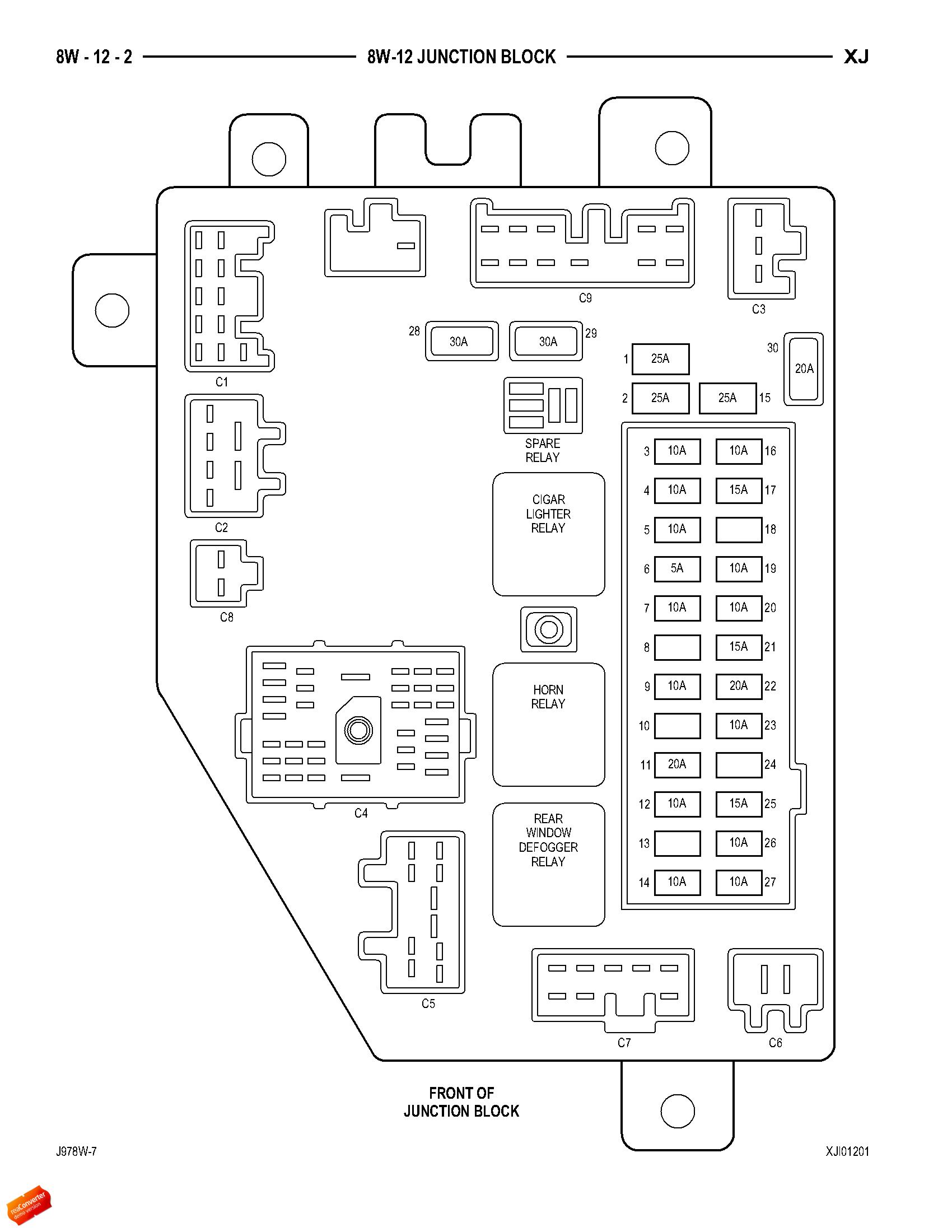
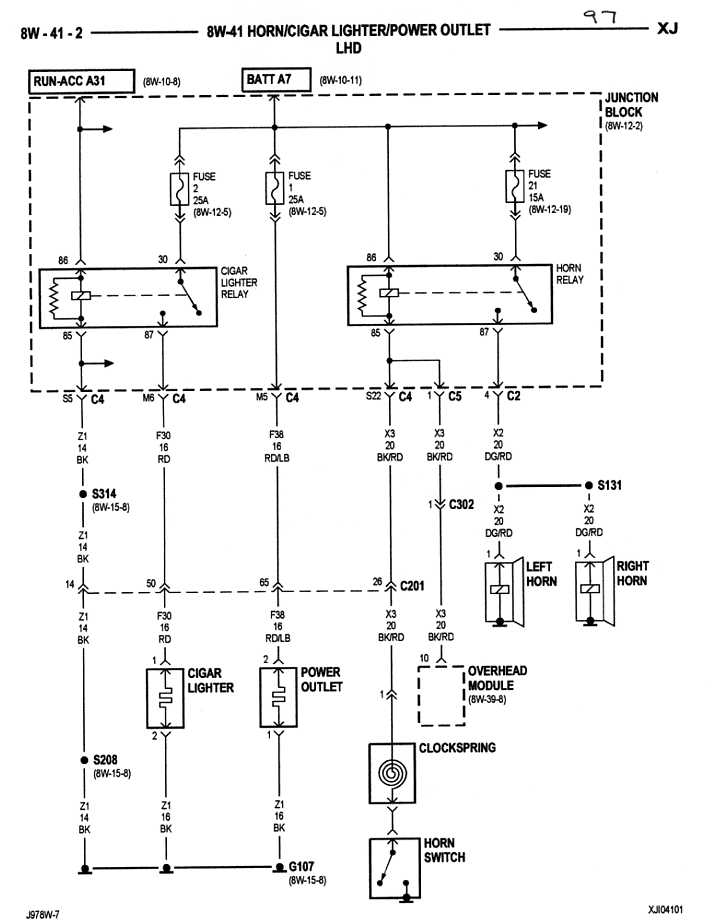
Note that in the above diagram the horn relay receives battery power to its control coil constantly and that the control coil is provided a ground to activate the coil power contacts via the horn switch, via the clockspring. Note also that the overhead console/dome light module provides a ground when the RKE is activated to LOCK.
If replacing the horn relay does not fix your problem, try removing the connector from the RKE module in the dome light or console and see if it silences the horn.
Edit: I don't know if you have Remote Keyless Entry or not but if you do, try deactivating the horn "Chirp" in the following manner:
To program the Remote Keyless Entry (RKE) receiver so that the horn chirp feature is disabled, proceed as follows:
(1) While within the reception range of the RKE receiver, press and hold the Lock button of a programmed RKE transmitter depressed for five to ten seconds.
(2) While holding the RKE transmitter Lock button depressed, press and release the RKE transmitter Unlock button.
(3) The RKE horn chirp feature is now disabled. Repeating the preceding steps will again enable the RKE horn chirp feature.
If replacing the horn relay does not fix your problem, try removing the connector from the RKE module in the dome light or console and see if it silences the horn.
Edit: I don't know if you have Remote Keyless Entry or not but if you do, try deactivating the horn "Chirp" in the following manner:
To program the Remote Keyless Entry (RKE) receiver so that the horn chirp feature is disabled, proceed as follows:
(1) While within the reception range of the RKE receiver, press and hold the Lock button of a programmed RKE transmitter depressed for five to ten seconds.
(2) While holding the RKE transmitter Lock button depressed, press and release the RKE transmitter Unlock button.
(3) The RKE horn chirp feature is now disabled. Repeating the preceding steps will again enable the RKE horn chirp feature.