


computer problems? maybe

Thread Starter
Junior Member
Joined: Dec 2011
Posts: 58
Likes: 0
 computer problems? maybe
So I've been slowly putting a lift kit on my 2000 cherokee SE. I've finally got tires that I'm putting on Monday but now I have a check engine light. the problem is my scan tool won't connect to the computer. also I went by Maryland emissions and their scan tool wouldn't connect to my computer either. I've tried to self check by cycling the key but it doesn't work. I don't know what the do. I've noticed that the computer has been replaced. it is not original. I've cleaned the diagnostic ports and put dielectric grease on it. I've disconnected the battery to reset the computer and the light still comes on. any ideas would be appreciated

Thread Starter
Junior Member
Joined: Dec 2011
Posts: 58
Likes: 0
So I checked all my fuses. they all look good. So I disconnected the battery to clear the cel. Then I took a drive and got gas. Found out that my girlfriend never put the cap on. She left it on the inside of the gas door. I had a good laugh while filling up. now since the cel light is gone, I still can't hook up a scan took and still can't pass my over due emission test. So I still need help.
Trending Topics
Thread Starter
Junior Member
Joined: Dec 2011
Posts: 58
Likes: 0
Okay so I checked for power and for ground at the obd port and im good. I get both. Any other ideas on why my scan reader.won't connect. The scan tools I have used power up but don't connect to the computer. all it says is linking error

Thread Starter
Junior Member
Joined: Dec 2011
Posts: 58
Likes: 0
So still no luck with my computer problem. The cel light is back on and scan tools will not connect to my Jeep. The scan tools get power from the Jeep, it just says unable to connect. So any other ideas would be nice. If not it's going to the dealership

CF Veteran
Joined: Aug 2010
Posts: 8,357
Likes: 103
From: Canton, MI
Year: 1999
Model: Cherokee
Engine: 4.0
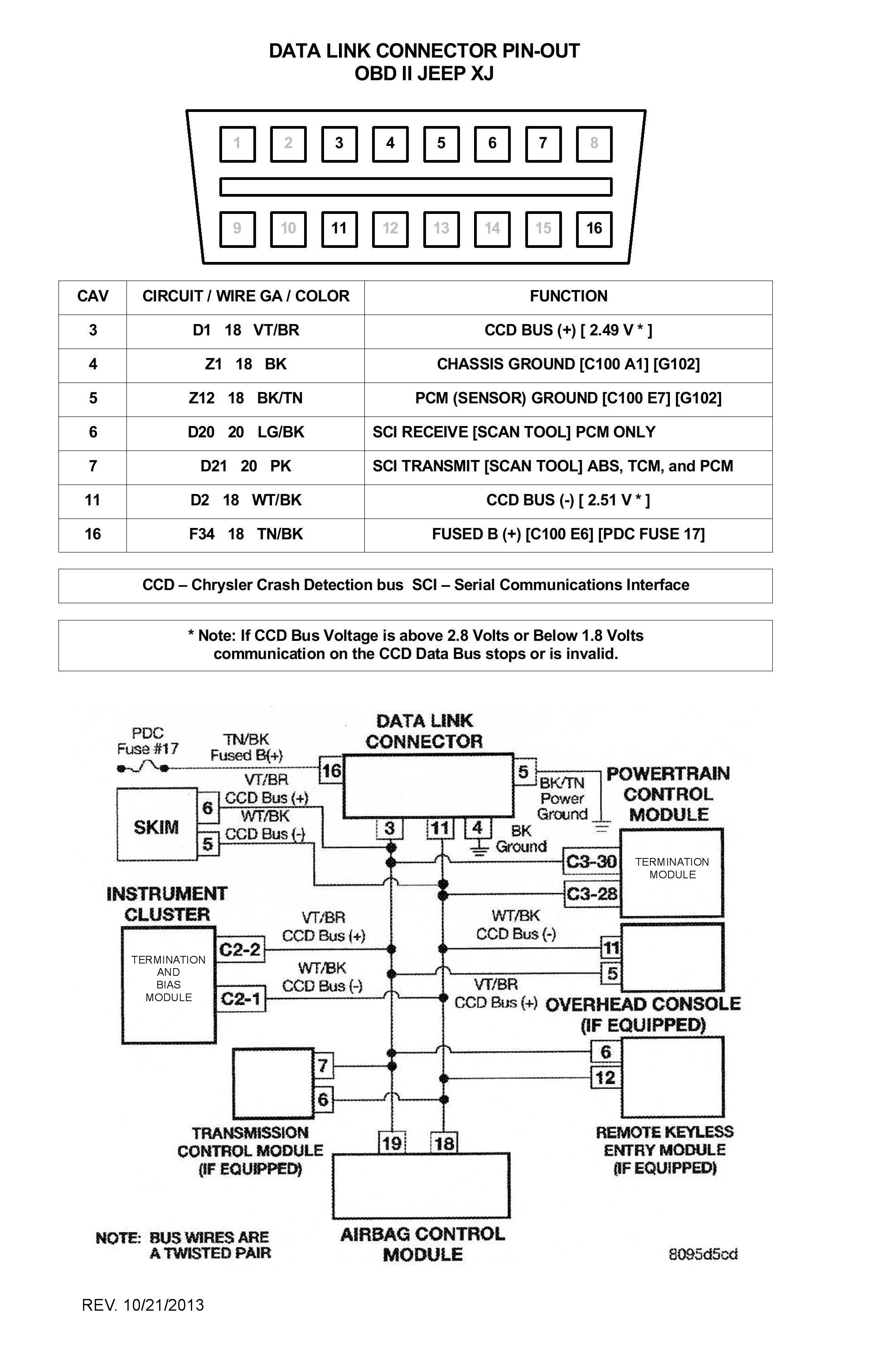
There's probably nothing you can do. If one, or both SCI circuits are open the scanner/reader will not communicate with the PCM or TCM. See pic below for the SCI pins.
Verify the scanner/reader you are trying to use has matching pins for the SCI pin cavities. You cannot check the SCI circuits with a common voltmeter.
Your CCD Bus system is a J1850 system. Make sure the scanner/reader you are using is a OBDII system reader.
Generally if a common OBDII compatible scanner/reader cannot communicate through the SCI circuits, the dealer's DRBIII tool probably won't either.
Double check the 12 volt power input to the DLC and the ground circuits (pins 4 and 5) continuity (after you've degreased the pin cavities).
The ground connections (4/5) are on the engine, G102, at the oil dipstick tube attach bracket stud. Make sure they are corrosion free and are securely attached.
Verify the scanner/reader you are trying to use has matching pins for the SCI pin cavities. You cannot check the SCI circuits with a common voltmeter.
Your CCD Bus system is a J1850 system. Make sure the scanner/reader you are using is a OBDII system reader.
Generally if a common OBDII compatible scanner/reader cannot communicate through the SCI circuits, the dealer's DRBIII tool probably won't either.
Double check the 12 volt power input to the DLC and the ground circuits (pins 4 and 5) continuity (after you've degreased the pin cavities).
The ground connections (4/5) are on the engine, G102, at the oil dipstick tube attach bracket stud. Make sure they are corrosion free and are securely attached.
CF Veteran
Joined: Aug 2010
Posts: 8,357
Likes: 103
From: Canton, MI
Year: 1999
Model: Cherokee
Engine: 4.0
You do have the ignition switch to RUN when try to connect don't you? Power to the DLC, pin 16, is powered from the battery bus and doesn't require the key to RUN.
CF Veteran
Joined: Aug 2010
Posts: 8,357
Likes: 103
From: Canton, MI
Year: 1999
Model: Cherokee
Engine: 4.0
So we're speaking the same language...
"Connect" means the scanner/reader is compatible with the DLC (pin wise) and, when plugged in to the DLC, is being provided 12 volts and is being provided a ground, and is connected to the DLC.
Not connected, or Cannot Connect, means the scanner is not compatible with the DLC or the scanner/reader is not being provided 12 volts, ground, or both.
"Communicate" means the scanner/reader is compatible and is connected to the DLC and can communicate (Transmit and Receive) with the CCD Bus through the SCI circuits.
No Communication indicates the scanner/reader cannot communicate with the CCD through the SCI circuits.
Specifically, what is the exact term showing up on the scanner/reader screen when it is plugged into the DLC and the key is in the RUN (engine off or running) position?
"Connect" means the scanner/reader is compatible with the DLC (pin wise) and, when plugged in to the DLC, is being provided 12 volts and is being provided a ground, and is connected to the DLC.
Not connected, or Cannot Connect, means the scanner is not compatible with the DLC or the scanner/reader is not being provided 12 volts, ground, or both.
"Communicate" means the scanner/reader is compatible and is connected to the DLC and can communicate (Transmit and Receive) with the CCD Bus through the SCI circuits.
No Communication indicates the scanner/reader cannot communicate with the CCD through the SCI circuits.
Specifically, what is the exact term showing up on the scanner/reader screen when it is plugged into the DLC and the key is in the RUN (engine off or running) position?