


How to (easily) search CherokeeForum.

Thread Starter
CF Veteran
Joined: Oct 2012
Posts: 2,314
Likes: 3
From: Canton, GA
Year: 1996
Model: Cherokee
Engine: 4.0
 How to (easily) search CherokeeForum.
I'm not really sure where this belongs, but I'll post it here. I'm sure somebody other than me will find it useful.
So, as many of you know... the CF search engine is pretty sucky. Furthermore, you can only use it so often... so if you mess up the query or need to change it, you're screwed.
The solution to this, as a lot of you know, is to use Google instead of the default CF search. This is done by typing "site:cherokeeforum.com" and then whatever you're searching for into Google.
I'm not a slow typist by any means, but it gets annoying to type site:cherokeeforum.com every time I want to search. So, I added a custom search engine to Google Chrome.
(THIS WILL ONLY WORK FOR GOOGLE CHROME. There are similar options on other browsers, but I only use Chrome, so I'm not going to cover them.)
To start, right-click the address bar.
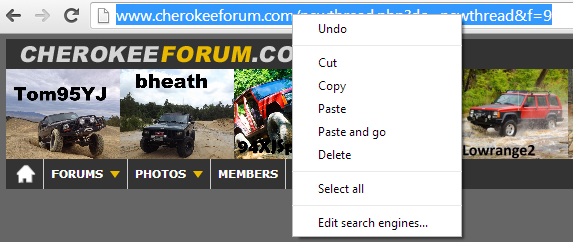
Click "Edit Search Engines", which will bring you to to this (yours will have more search engines, but this is basically what it should look like):
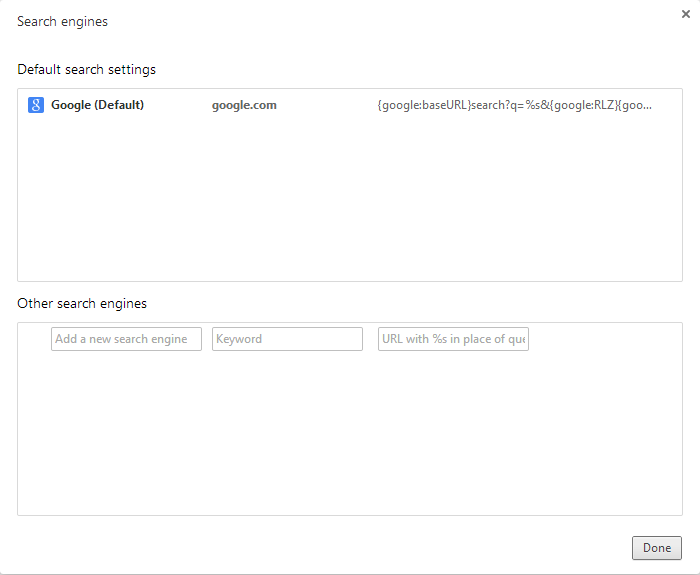
You'll want to focus on where it says "Other search engines".
In the first box, type whatever you want--it won't affect anything at all. I simply used "CherokeeForum".
The second box, however, is very important. It specifies the keyword that lets the browser know when you're trying to search CherokeeForum. I used "cf".
The third box is the URL that the search should lead to. There is a variable that is used--%s. This contains anything that is typed after the keyword.
What you should put in the third box is this: https://www.google.com/#q=site:cherokeeforum.com+%s
Press the enter key on your keyboard and it will be added to the list of search engines.
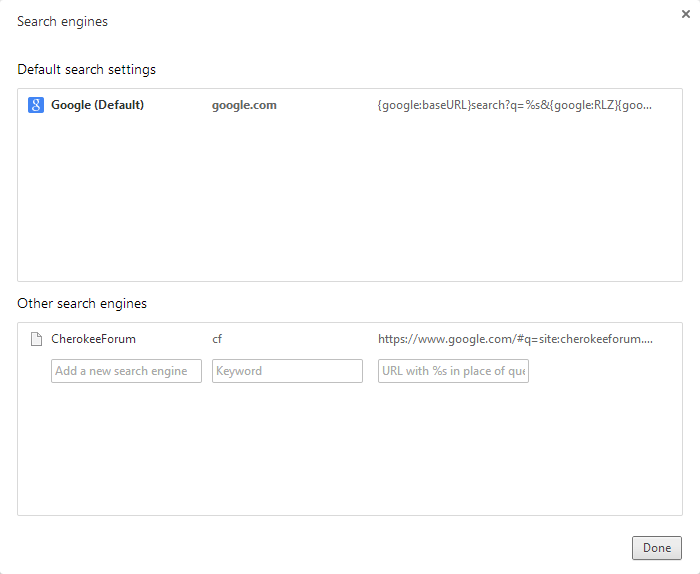
Woohoo! All done. To search, simply begin typing into the address bar. Begin queries with whatever you selected as the keyword--again, in my case "cf".
For example, I could type "cf headlight harness" and it would bring me to this page:
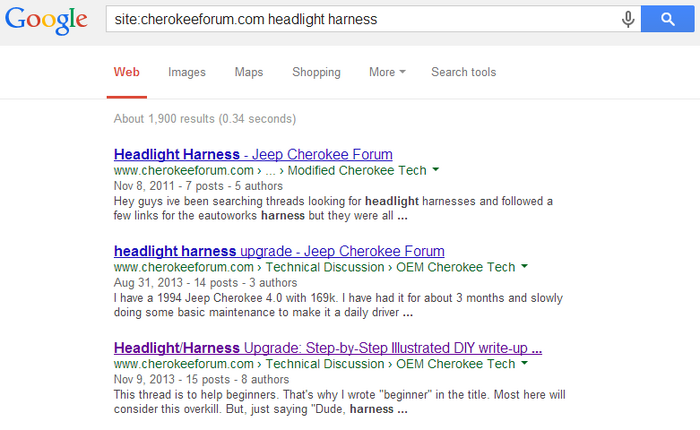
So, yeah. That's it. I'm lazy. :P
So, as many of you know... the CF search engine is pretty sucky. Furthermore, you can only use it so often... so if you mess up the query or need to change it, you're screwed.
The solution to this, as a lot of you know, is to use Google instead of the default CF search. This is done by typing "site:cherokeeforum.com" and then whatever you're searching for into Google.
I'm not a slow typist by any means, but it gets annoying to type site:cherokeeforum.com every time I want to search. So, I added a custom search engine to Google Chrome.
(THIS WILL ONLY WORK FOR GOOGLE CHROME. There are similar options on other browsers, but I only use Chrome, so I'm not going to cover them.)
To start, right-click the address bar.
Click "Edit Search Engines", which will bring you to to this (yours will have more search engines, but this is basically what it should look like):
You'll want to focus on where it says "Other search engines".
In the first box, type whatever you want--it won't affect anything at all. I simply used "CherokeeForum".
The second box, however, is very important. It specifies the keyword that lets the browser know when you're trying to search CherokeeForum. I used "cf".
The third box is the URL that the search should lead to. There is a variable that is used--%s. This contains anything that is typed after the keyword.
What you should put in the third box is this: https://www.google.com/#q=site:cherokeeforum.com+%s
Press the enter key on your keyboard and it will be added to the list of search engines.
Woohoo! All done. To search, simply begin typing into the address bar. Begin queries with whatever you selected as the keyword--again, in my case "cf".
For example, I could type "cf headlight harness" and it would bring me to this page:

So, yeah. That's it. I'm lazy. :P



No, I don't lick fish.


Joined: Mar 2011
Posts: 11,169
Likes: 26
From: Northern Kentucky
Year: 1999
Model: Cherokee (XJ)
Engine: 4.0
Good job man, that's some pretty good info. I never knew this about chrome. I'll have to try on IE as well (for work - I use chrome at home).

Thread Starter
CF Veteran
Joined: Oct 2012
Posts: 2,314
Likes: 3
From: Canton, GA
Year: 1996
Model: Cherokee
Engine: 4.0




Senior Member
Joined: Feb 2012
Posts: 905
Likes: 8
From: New Hampshire
Year: 1998
Model: Cherokee
Engine: 4.0L I6
Trending Topics



Thread
Thread Starter
Forum
Replies
Last Post
Rogue4x4
Stock Grand Cherokee Tech. All ZJ/WJ/WK Non-modified/stock questions go here!
1
Sep 23, 2014 10:59 AM
Currently Active Users Viewing This Thread: 1 (0 members and 1 guests)

