
Can y'all help me troubleshoot this? I am challenged when it comes to automotive stuff. But basically, my problem is that when I have my radio on and I turn the headlights on, the radio goes off. The radio also turns off if I turn it up too loud.
Any help would be great as I would like some music so I don't kill myself on my six hour trip coming up here.
Thanks!
Any help would be great as I would like some music so I don't kill myself on my six hour trip coming up here.
Thanks!
Senior Member
hello,
Thats a tricking one you got there.. havent heard of this one yet. But i would start by pulling out the radio.(factory or after??) and check all the connections making sure they are secure with no open wires.. it seems to me like you illumination wire for the radio is touching something.. since that is incorporated with the lights..
Thats a tricking one you got there.. havent heard of this one yet. But i would start by pulling out the radio.(factory or after??) and check all the connections making sure they are secure with no open wires.. it seems to me like you illumination wire for the radio is touching something.. since that is incorporated with the lights..
"CF Moderator"
Quote:
Any help would be great as I would like some music so I don't kill myself on my six hour trip coming up here.
Thanks!
Hi, we need more info if possible. What radio do you have, who put it in and does it go totally out or just the sound? ...TjOriginally Posted by chiefcherokee
Can y'all help me troubleshoot this? I am challenged when it comes to automotive stuff. But basically, my problem is that when I have my radio on and I turn the headlights on, the radio goes off. The radio also turns off if I turn it up too loud. Any help would be great as I would like some music so I don't kill myself on my six hour trip coming up here.
Thanks!
It is a Sony Xplod that was installed by the previous owner. The illumination on the radio is the same in night as it is in day. This never used to happen until a few months ago...

Check the fuse panel under the driver's side dash.
When I put in my head unit, the power line to the unit killed itself, so I had to wire it to one of the open fuse slots. Which of course has to do with lights, so when I turn my lights on, my head unit resets. Still works while the lights are on though.
the po probably did the same.
When I put in my head unit, the power line to the unit killed itself, so I had to wire it to one of the open fuse slots. Which of course has to do with lights, so when I turn my lights on, my head unit resets. Still works while the lights are on though.
the po probably did the same.
CF Veteran
Quote:
Any help would be great as I would like some music so I don't kill myself on my six hour trip coming up here.
Thanks!
it is wired wrong, the switch wire is probobly wired to the wrong one. the only way to fix this is to cut the wires and re-splice them with a diagram. luckly for you i happen to have one on hand that i made for myself. i had the same problem in my 88 when i bought it, it had the soxy x-ploid head unit as well and would cutoff when the headlights were on. re-wired it and it worked great! so good luck. here is the diagram i used:Originally Posted by chiefcherokee
Can y'all help me troubleshoot this? I am challenged when it comes to automotive stuff. But basically, my problem is that when I have my radio on and I turn the headlights on, the radio goes off. The radio also turns off if I turn it up too loud. Any help would be great as I would like some music so I don't kill myself on my six hour trip coming up here.
Thanks!
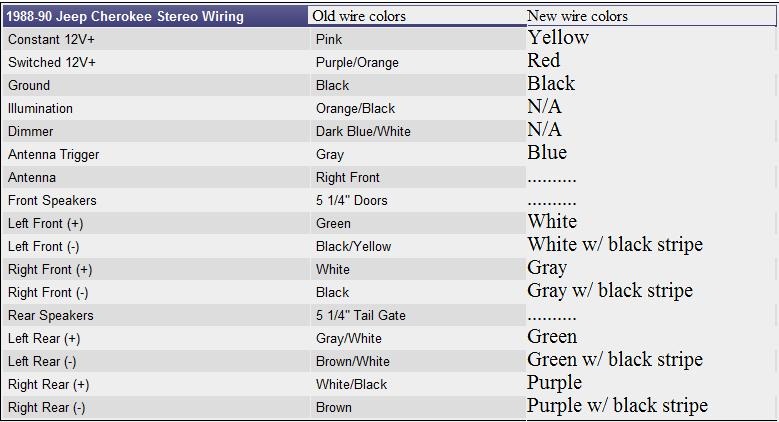
sry i just realized that you have a 1998...well here is what your wires are and just match them up with the new ones. the new wires are all the same color if you have an aftermarket radio.
Car Radio Constant 12V+ Wire: Pink/Yellow
Car Radio Switched 12V+ Wire: Red/White
Car Radio Ground Wire: Black
Car Radio Illumination Wire: Orange/Black
Car Radio Dimmer Wire: Black/Light Blue
Car Radio Antenna Trigger Wire: N/A
Car Radio Amp Trigger Wire: N/A
Front Speakers Size: 6 1/2″
Front Speakers Location: Doors
Left Front Speaker Wire (+): Dark Green
Left Front Speaker Wire (-): Brown/Red
Right Front Speaker Wire (+): Purple
Right Front Speaker Wire (-): Dark Blue/Red
Rear Speakers Size: 5 1/4″
Rear Speakers Location: Rear Deck
Left Rear Speaker Wire (+): Brown/Yellow
Left Rear Speaker Wire (-): Brown/Light Blue
Right Rear Speaker Wire (+): Dark Blue/White
Right Rear Speaker Wire (-): Dark Blue/Orange
Hope this helps you. here is the website for future reference of where i got my info from. has listings of over 10000 vehicles on there!
http://www.modifiedlife.com/1998-jee...iring-diagram/
Thanks for the help everyone! I took out the radio and messed with the switch wires and its working just fine for now!