


need help

Moderator CF K9-unit
Joined: Apr 2012
Posts: 5,842
Likes: 12
From: Alaska
Year: 2000 sport
Model: Cherokee (XJ)
Engine: New 4.0l from s&j engines

Need codes,, go to a parts store and see if they will scan it for you.. Autozone, O'reilly, Napa, Pepboys. Then come back and let us know what codes it throws..


CF Veteran
Joined: Aug 2010
Posts: 8,357
Likes: 103
From: Canton, MI
Year: 1999
Model: Cherokee
Engine: 4.0
grave,
Two things may be wrong here.
The data Link connector pin cavities are corroded and there no power available at the DLC, or the ground for the DLC is corroded and no ground is available.
Look at the pin cavities on your DLC and see if the pin cavities are green.
Next, go to the ground point for the DLC (G102) and disassemble it. Scrub the ring terminals clean with 3M gray Scotch Brite pads or 400 grit sandpaper, then reassemble the ring terminals to the stud securely.
If the DLC pin cavities are corroded, clean them using a tooth pic dipped in White Vinegar, followed by a spary down using CRC QD Electronic Cleaner, and if necessary, use a tooth brush dipped in Vinegar and scrub the pin cavities.
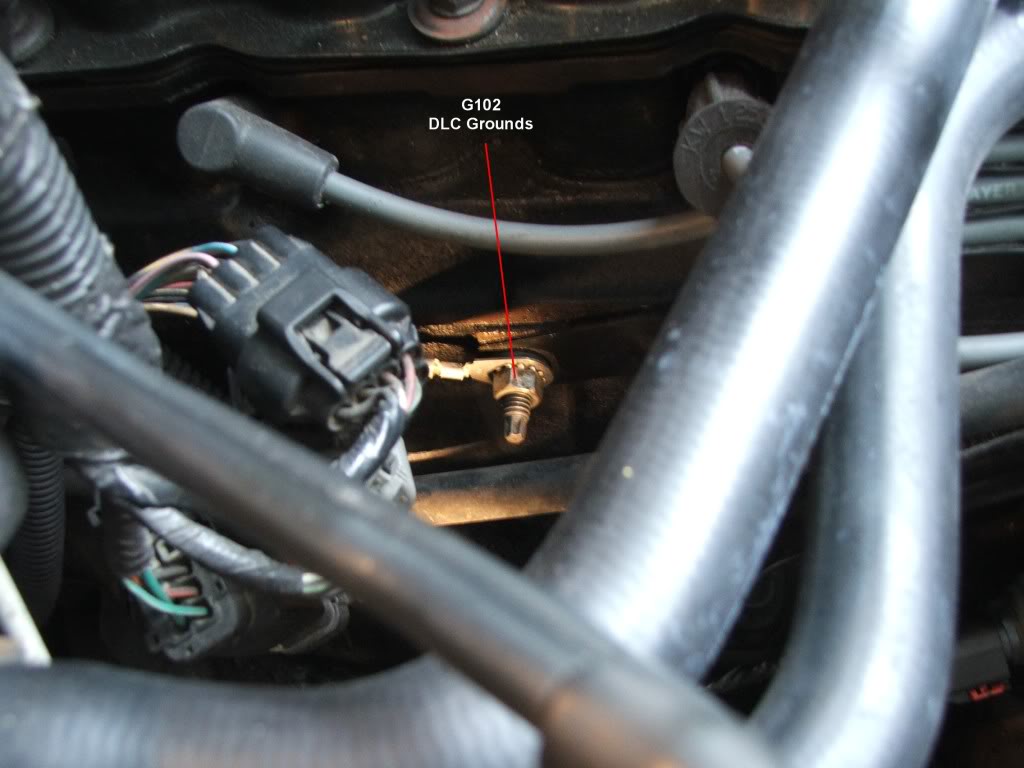
G102:
G102 is at the oil dipstick tube bracket stud.
Two things may be wrong here.
The data Link connector pin cavities are corroded and there no power available at the DLC, or the ground for the DLC is corroded and no ground is available.
Look at the pin cavities on your DLC and see if the pin cavities are green.
Next, go to the ground point for the DLC (G102) and disassemble it. Scrub the ring terminals clean with 3M gray Scotch Brite pads or 400 grit sandpaper, then reassemble the ring terminals to the stud securely.
If the DLC pin cavities are corroded, clean them using a tooth pic dipped in White Vinegar, followed by a spary down using CRC QD Electronic Cleaner, and if necessary, use a tooth brush dipped in Vinegar and scrub the pin cavities.
G102:
G102 is at the oil dipstick tube bracket stud.

Thread Starter
Newbie
Joined: Nov 2014
Posts: 4
Likes: 0
Model: Cherokee
reply
[
Two things may be wrong here.
The data Link connector pin cavities are corroded and there no power available at the DLC, or the ground for the DLC is corroded and no ground is available.
Look at the pin cavities on your DLC and see if the pin cavities are green.
Next, go to the ground point for the DLC (G102) and disassemble it. Scrub the ring terminals clean with 3M gray Scotch Brite pads or 400 grit sandpaper, then reassemble the ring terminals to the stud securely.
If the DLC pin cavities are corroded, clean them using a tooth pic dipped in White Vinegar, followed by a spary down using CRC QD Electronic Cleaner, and if necessary, use a tooth brush dipped in Vinegar and scrub the pin cavities.
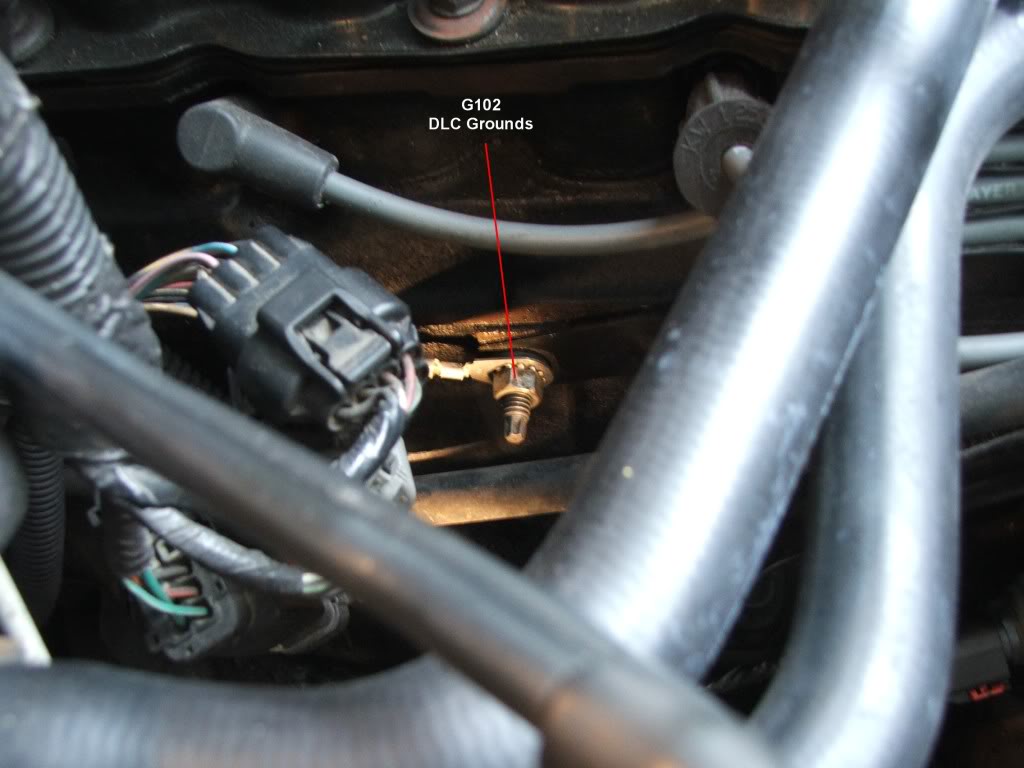
G102:
G102 is at the oil dipstick tube bracket stud.
 [/QUOTE]
Two things may be wrong here.
The data Link connector pin cavities are corroded and there no power available at the DLC, or the ground for the DLC is corroded and no ground is available.
Look at the pin cavities on your DLC and see if the pin cavities are green.
Next, go to the ground point for the DLC (G102) and disassemble it. Scrub the ring terminals clean with 3M gray Scotch Brite pads or 400 grit sandpaper, then reassemble the ring terminals to the stud securely.
If the DLC pin cavities are corroded, clean them using a tooth pic dipped in White Vinegar, followed by a spary down using CRC QD Electronic Cleaner, and if necessary, use a tooth brush dipped in Vinegar and scrub the pin cavities.
G102:
G102 is at the oil dipstick tube bracket stud.
[/QUOTE]

