


How to Post on CherokeeForum.com


Thread Starter
Senior Member
Joined: Aug 2008
Posts: 544
Likes: 4
 How to Post on CherokeeForum.com
We get a lot of new member on this site every day and some of them are having trouble figuring out how to post. This walk through is designed to help you get started. If after reading this you still have questions feel free to Contact Us. This may seem complex to newcomers at first but once you do it you'll see that it's pretty simple. If you give it a little effort I'm sure it will be well worth your time.
Register and Log In
If you haven't already, please Register for a Free Account. It's fast, easy, and FREE so go ahead and sign up today.
Once you've created an account make sure your logged in. The easiest way to log in is to enter your username and password into the upper right hand corner text boxes shown below.
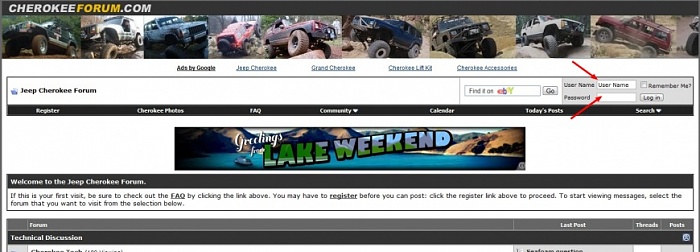
Make sure you have Cookies Enabled on your browser and to check the box that says "Remember Me?" so you stay logged in. Then press the "Log In" button
Posting a New Topic (aka Thread)
1. Picking a Category (aka Forum Topic)
Before you can start a new topic you need to pick a category for it to reside in. This helps us keep the site organized and to make it easier for you to find your post later on.
If your on our homepage you will see a list of this categories. For example there is Cherokee Tech, Grand Cherokee Tech, etc... Click on the category name that best fits your post and you will enter into that forum topic.
2. Posting a New Topic (aka Thread)
Once you've registered, logged in, and picked a category for your post your ready to get started.
Look for a button that looks like this:

Click on that and you will be directed to a new page with two text boxes. One for Title and one for your Message. Enter in your Title and Message and then hit the button that says "Submit New Thread"
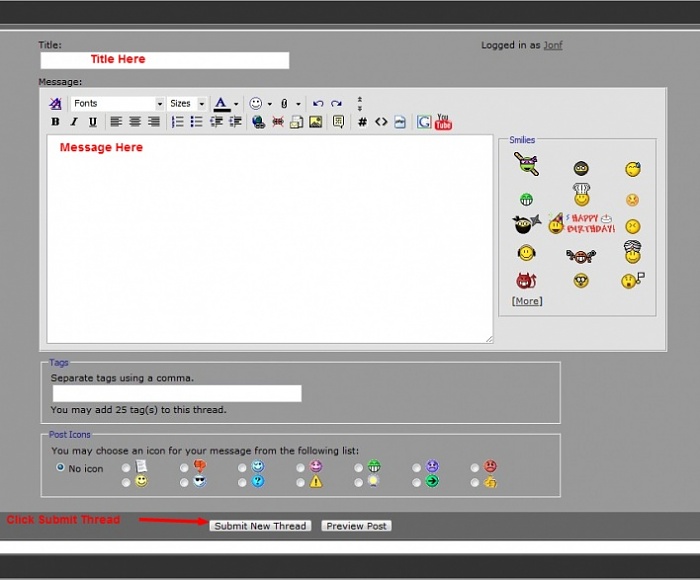
There are a lot of things you can do here such as subscribe to get email notifications of replies, attach files, add images, smiles, etc... but this is the basic way to post a new thread.
Replying to a Topic (aka Thread)
In addition to posting your own topic you can also reply to existing ones. This is how the conversation takes place on the site. If you are reading a thread and want to reply you can do so two different ways.
First, there is a text box on the bottom of the thread where you can type a "quick reply". Just type your response into the box provided and then click on the button that says "Post Quick Reply"
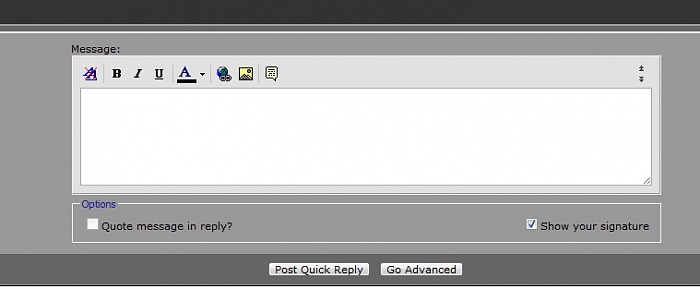
You can also click the button on the top and bottom left of the thread that says "Post Reply". You will then get a text box with more editing options for your reply.
I hope this walk through helped you understand how to post on our site and once again please feel free to contact us if you have any questions. Thanks!!
Register and Log In
If you haven't already, please Register for a Free Account. It's fast, easy, and FREE so go ahead and sign up today.
Once you've created an account make sure your logged in. The easiest way to log in is to enter your username and password into the upper right hand corner text boxes shown below.
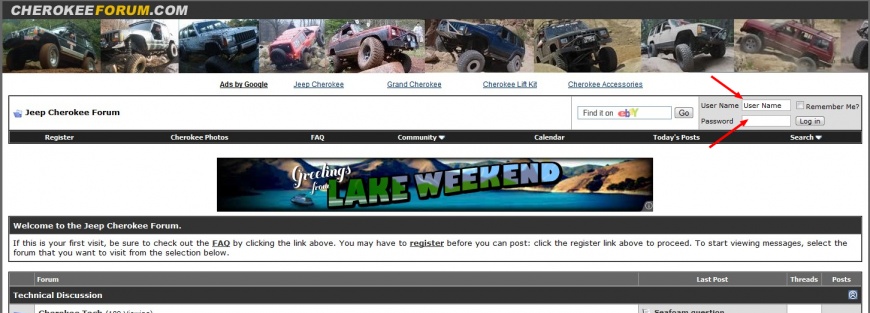
Make sure you have Cookies Enabled on your browser and to check the box that says "Remember Me?" so you stay logged in. Then press the "Log In" button
Posting a New Topic (aka Thread)
1. Picking a Category (aka Forum Topic)
Before you can start a new topic you need to pick a category for it to reside in. This helps us keep the site organized and to make it easier for you to find your post later on.
If your on our homepage you will see a list of this categories. For example there is Cherokee Tech, Grand Cherokee Tech, etc... Click on the category name that best fits your post and you will enter into that forum topic.
2. Posting a New Topic (aka Thread)
Once you've registered, logged in, and picked a category for your post your ready to get started.
Look for a button that looks like this:
Click on that and you will be directed to a new page with two text boxes. One for Title and one for your Message. Enter in your Title and Message and then hit the button that says "Submit New Thread"
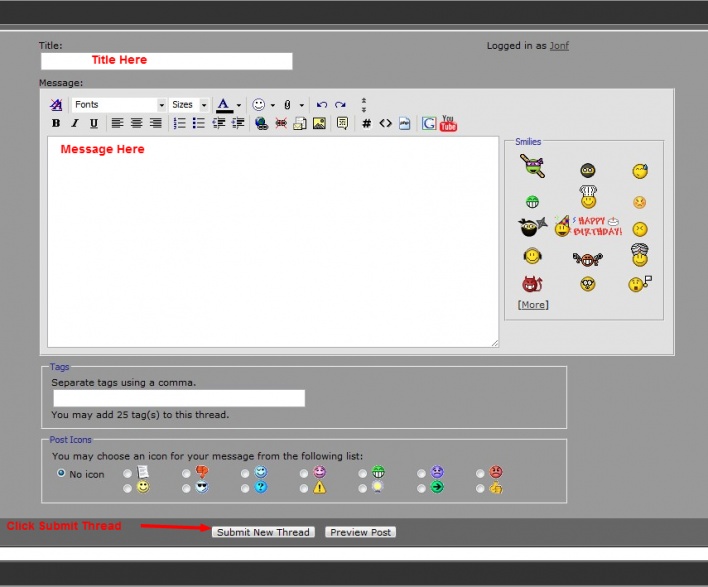
There are a lot of things you can do here such as subscribe to get email notifications of replies, attach files, add images, smiles, etc... but this is the basic way to post a new thread.
Replying to a Topic (aka Thread)
In addition to posting your own topic you can also reply to existing ones. This is how the conversation takes place on the site. If you are reading a thread and want to reply you can do so two different ways.
First, there is a text box on the bottom of the thread where you can type a "quick reply". Just type your response into the box provided and then click on the button that says "Post Quick Reply"
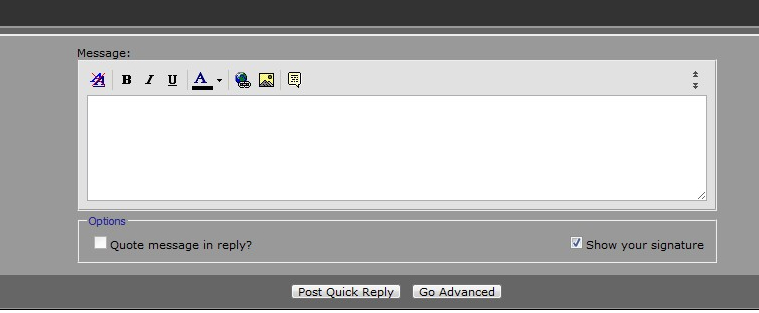
You can also click the button on the top and bottom left of the thread that says "Post Reply". You will then get a text box with more editing options for your reply.
I hope this walk through helped you understand how to post on our site and once again please feel free to contact us if you have any questions. Thanks!!



Newbie
Joined: May 2011
Posts: 2
Likes: 1
From: Woodstock Ga
Year: 1996
Model: Cherokee
Engine: 4.0
 I love my Jeep!!!!!!!
Just bought this 1996 with 129k 3 months ago. I have had to repair a few little things but. Last friday I hit a bad chuck hole in atlanta and the transmission started to rummmble. I could not find much at first and had a very busy weekend to attend too. So I just keep driving. I went home to north of woodstock, Pack our camping gear and headed off to the mountains with my son. We camped at the Scout reserve and had a great weekend. The Trans still making noises all the way up and all the way back. Then I went to work monday, tuesday and then today and the Cooing line for the transmission broke completely. I have been driving for 5 days with little to no transmission fluid. I love this jeep. Fixed (TEMP) with 6 inch hose and plan to replace both lines this weekend. It true you cant stop a Jeep.
little Deer
little Deer


Trending Topics
Newbie
Joined: Jun 2011
Posts: 28
Likes: 1
From: Saskatoon, SK, Canada
Year: 1995
Model: Cherokee
Engine: 4.0 litre
Thank you for the tips, I look forward to figuring the site out, and learning about Cherokees. I just bought a 1995 Cherokee "country" edition 165,000k. I'm a first time jeep owner and have lots of questions.

Newbie
Joined: Aug 2011
Posts: 4
Likes: 0
From: Davenport IA
Year: 2000
Model: Cherokee
Engine: 6
We get a lot of new member on this site every day and some of them are having trouble figuring out how to post. This walk through is designed to help you get started. If after reading this you still have questions feel free to Contact Us. This may seem complex to newcomers at first but once you do it you'll see that it's pretty simple. If you give it a little effort I'm sure it will be well worth your time.
Register and Log In
If you haven't already, please Register for a Free Account. It's fast, easy, and FREE so go ahead and sign up today.
Once you've created an account make sure your logged in. The easiest way to log in is to enter your username and password into the upper right hand corner text boxes shown below.
Attachment 25135
Make sure you have Cookies Enabled on your browser and to check the box that says "Remember Me?" so you stay logged in. Then press the "Log In" button
Posting a New Topic (aka Thread)
1. Picking a Category (aka Forum Topic)
Before you can start a new topic you need to pick a category for it to reside in. This helps us keep the site organized and to make it easier for you to find your post later on.
If your on our homepage you will see a list of this categories. For example there is Cherokee Tech, Grand Cherokee Tech, etc... Click on the category name that best fits your post and you will enter into that forum topic.
2. Posting a New Topic (aka Thread)
Once you've registered, logged in, and picked a category for your post your ready to get started.
Look for a button that looks like this:
Attachment 25138
Click on that and you will be directed to a new page with two text boxes. One for Title and one for your Message. Enter in your Title and Message and then hit the button that says "Submit New Thread"
Attachment 25140
There are a lot of things you can do here such as subscribe to get email notifications of replies, attach files, add images, smiles, etc... but this is the basic way to post a new thread.
Replying to a Topic (aka Thread)
In addition to posting your own topic you can also reply to existing ones. This is how the conversation takes place on the site. If you are reading a thread and want to reply you can do so two different ways.
First, there is a text box on the bottom of the thread where you can type a "quick reply". Just type your response into the box provided and then click on the button that says "Post Quick Reply"
Attachment 25141
You can also click the button on the top and bottom left of the thread that says "Post Reply". You will then get a text box with more editing options for your reply.
I hope this walk through helped you understand how to post on our site and once again please feel free to contact us if you have any questions. Thanks!!
Register and Log In
If you haven't already, please Register for a Free Account. It's fast, easy, and FREE so go ahead and sign up today.
Once you've created an account make sure your logged in. The easiest way to log in is to enter your username and password into the upper right hand corner text boxes shown below.
Attachment 25135
Make sure you have Cookies Enabled on your browser and to check the box that says "Remember Me?" so you stay logged in. Then press the "Log In" button
Posting a New Topic (aka Thread)
1. Picking a Category (aka Forum Topic)
Before you can start a new topic you need to pick a category for it to reside in. This helps us keep the site organized and to make it easier for you to find your post later on.
If your on our homepage you will see a list of this categories. For example there is Cherokee Tech, Grand Cherokee Tech, etc... Click on the category name that best fits your post and you will enter into that forum topic.
2. Posting a New Topic (aka Thread)
Once you've registered, logged in, and picked a category for your post your ready to get started.
Look for a button that looks like this:
Attachment 25138
Click on that and you will be directed to a new page with two text boxes. One for Title and one for your Message. Enter in your Title and Message and then hit the button that says "Submit New Thread"
Attachment 25140
There are a lot of things you can do here such as subscribe to get email notifications of replies, attach files, add images, smiles, etc... but this is the basic way to post a new thread.
Replying to a Topic (aka Thread)
In addition to posting your own topic you can also reply to existing ones. This is how the conversation takes place on the site. If you are reading a thread and want to reply you can do so two different ways.
First, there is a text box on the bottom of the thread where you can type a "quick reply". Just type your response into the box provided and then click on the button that says "Post Quick Reply"
Attachment 25141
You can also click the button on the top and bottom left of the thread that says "Post Reply". You will then get a text box with more editing options for your reply.
I hope this walk through helped you understand how to post on our site and once again please feel free to contact us if you have any questions. Thanks!!


Member
Joined: Sep 2011
Posts: 197
Likes: 0
From: Illinois
Year: 1998
Model: Cherokee
Engine: 4.0
I have been on this forum for a bit and i would like to get a picture on my account so when i post something a picture of my jeep comes up below my posting. Any help?
CF Veteran
Joined: Sep 2010
Posts: 21,168
Likes: 5
From: Milwaukee, WI
Year: 1987
Engine: Check
Not the right place for this. This is for learning how to post threads and replies.
To answer your question its in your user control panel, and must be done from a computer.
From user CP you will look on the left for 'Edit Avatar Pic" or something along those lines.
To answer your question its in your user control panel, and must be done from a computer.
From user CP you will look on the left for 'Edit Avatar Pic" or something along those lines.
Member
Joined: Sep 2011
Posts: 197
Likes: 0
From: Illinois
Year: 1998
Model: Cherokee
Engine: 4.0
thanks for the help brotha, i had a newbie question so i just thought this was the appropriate thread, my bad
